
FREE Excel to Tally XML Converter | Free Convert Vouchers, Banks & Masters to Tally XML
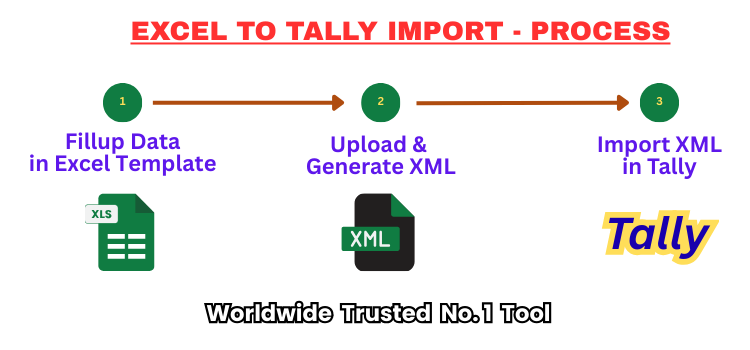
FREE Excel to Tally XML Converter | Convert Vouchers, Banks & Masters to Tally XML
Simplify your accounting process with our Free Excel to Tally XML Converter—a powerful online tool designed to convert bulk Excel data files into Tally XML compatible formats within minutes. Whether you are in the US, UAE, UK, or anywhere around the world, this free utility allows you to seamlessly import financial data into Tally ERP 9, Tally Prime, or Tally 7.2 without any manual effort or complex installations. Ideal for accountants, businesses, and consultants, our converter software supports the import of master ledgers with essential fields like Ledger Name, Group, GST Number, State Code, PAN, Contact Details, and Opening Balances. This saves hours of manual data entry while ensuring complete accuracy and compliance with Tally’s structure.
You can also import bank statements from Excel to Tally, including debit and credit transactions, narration, and dates—automatically validated and formatted. The tool supports multi ledgers and multi stock item vouchers & forex multi currencies vouchers such as Sales, Purchase, Receipt, Payment, and Journal entries, capturing item-wise quantities, rates, and values in a single pass. Just upload your Excel file using our ready-made templates, click to generate XML, and download the file ready for import into Tally. The process fully validates your Excel records data and shows error reports if any. It is fully secure, and no data is stored on our servers. Try the Free Excel to Tally XML Converter today and experience fast, reliable, and error-free data import—from Excel to Tally—in just a few clicks.
⬇️ Download Excel To Tally Templates:
- Download the latest Masters & Vouchers & Auto-Menu Excel template – Download Now
- VCHR_Voucher_Multi_Columnar_Format: Excel template for Unlimited Ledgers with Multi Stocks, Cost Centers, References in Columnar Format for all Tally Versions.
- VROW_Voucher_Multi_Row_Format: Excel template for Unlimited Ledgers with Multi Stocks, Cost Centers, References in Row Wise Format for all Tally Versions.
- LEDN_Ledger_Tally_All: Excel template for Master Ledgers – works with Tally Prime.
- LEDS_Ledger_Tally_7: Excel template for Master Ledgers – works with Tally 7.2 & ERP 9.
- ITMS_Stock_Tally_7: Excel template for Master Stocks – works with Tally 7.2 & ERP 9.
- ITMN_Stock_Tally_All: Excel template for Master Stocks – works with Tally Prime.
- BANK_Tally_All: Bank ledger Excel format for Bank Statements Transaction with all Tally Versions.
- Auto_Menu: Press F1 to open Auto Menu for data validation, error removal, auto Dr/Cr ledger values, and more.
- Macros Enabled Templates: All templates are macros-enabled (.xlsm) for automated data processing.
- Data Strong Validation Applied: Templates include strong validation rules to prevent Tally import errors.
- Uniform Structure: Templates follow a fixed column order and naming system to ensure accurate XML conversion.
🔁 How to convert Excel data into Tally XML file?
- Read Help Guide & Videos before starting.
- Download the latest Masters or Vouchers Excel template – Download Now.
- Do not rename the downloaded Excel Template file.
- Fill data exactly as per the Excel template format.
- Make Debit all Ledgers Amount in MINUS (-). Take Help of AUTO-MENU for Auto make minus.
- Use the AUTO MENU in Template to automatically generate DR/CR values.
- Ensure all data is correctly validated and error-free.
- Remove all empty rows before uploading. (Use CTRL + END to check)
- Make sure file is saved before uploading.
- Upload the filled Excel file on the website.
- Click on the “GENERATE” xml button to convert.
- Wait until processing completes and download the XML file.
- The downloaded XML file is ready for Tally import.
📂 How to Import XML File in Tally?
- Open Tally and choose the company where you want to import data.
- Go to the Import of Data section.
- Select either Masters or Vouchers option depending on your file.
- Enter the full file path of the XML file, for example
c:\vch.xml. - The import process will begin automatically.
- Ensure all Master entries like Ledgers, Items, and Groups are created before importing vouchers.
- If errors occur, check the
Tally.impfile for detailed error messages.
⚡ Advanced AutoMenu Utility for Faster Data Processing
- Automated Dr/Cr Assignment: Automatically formats Debit and Credit amounts based on the specific voucher type, completely eliminating the need to manually add minus (-) signs for debit entries.
- Smart Date Correction: Instantly detects and auto-corrects invalid date formats to ensure strict compatibility and seamless import into your Tally software.
- Data Cleansing & Error Removal: Automatically scans your spreadsheet to remove hidden characters, extra spaces, and common formatting errors from your raw Excel data before generating the XML.
- Instant Auto-Start: The AutoMenu utility automatically initializes as soon as you open the downloaded Excel template, keeping your workspace highly efficient from the very first click.
- Accelerated Workflow: Always use this built-in feature to drastically reduce manual formatting time and speed up your overall data entry and accounting processes.
- Macro Activation Required: To utilize these powerful automated features, you must enable Excel macros in your system settings when opening the template file.
🗂️ Free Excel to Tally XML Converter Features:
- Upload Excel template file up to limited size in free plan.
- Upgrade to Paid Subscription to upload Excel files for more limit.
- Convert unlimited bulk Excel records entries into Tally XML format.
- Includes all available templates for Masters and Vouchers.
- Compatible with Tally Prime, ERP 9, Tally 7.2, and higher versions.
- Import all types of vouchers: Receipt, Payment, Contra, Journal, Sales, Purchase, Credit Note, Debit Note, Forex Currencies & more.
- Import all Masters & Stocks includes all fields.
- Utiltiy validate your Excel data and show complete error reports.
- Not to Map Excel columns to Tally fields.
- AUTO-MENU – for Auto Formatting & Easy to make your Excel data perfectly.
- Work online by logging into your account anytime, anywhere.
- No software installation required – works directly in browser.
- Secure file processing – no data is stored.
- Easy-to-use interface suitable for all users.
- Fast processing – generates XML in just a few seconds.
- Read Help Guide & see Video tutorials – Click.
- Read our more Features – Click
🛡️ Secure and Private Online XML Conversion Software
Data privacy is our top priority when you use our online XML conversion software. We understand that your financial records, bank statements, and client ledgers contain highly sensitive information. Our import utility processes your uploaded Excel files in real-time and immediately deletes them from our servers once the XML is successfully generated. Because this tool operates entirely within your web browser, there is no risk of third-party data interception. Enjoy complete peace of mind knowing that your automated accounting tasks are executed in a profoundly safe and entirely secure digital environment.
⚙️ Advanced Data Validation and Error Handling Utility
One of the standout features of our free Excel to Tally XML converter is its built-in advanced data validation engine. Before generating the final XML file, this highly intelligent utility actively scans your uploaded spreadsheet for missing mandatory fields, incorrect data types, or mismatched GST formatting. If it detects any inconsistencies, the software immediately provides a comprehensive error report, allowing you to correct the data right away. This proactive error-handling process ensures that your files will never face frustrating rejections during the final Tally import phase, ultimately saving you valuable time and effort.
🚀 Lightning-Fast Bulk Data Import Tool for Accountants
For modern chartered accountants and busy finance teams, speed is everything. Our powerful online tool is meticulously engineered to rapidly process tens of thousands of rows of complex accounting data in mere seconds. Whether you are generating bulk stock items, intricate payroll journal entries, or heavy monthly sales vouchers, the conversion is executed with lightning speed and absolute precision. By utilizing this advanced Excel to Tally XML converter, you effectively eliminate massive data entry bottlenecks, allowing your financial operations to run smoother and much more efficiently than ever before.

📣 Related Posts:
-
 How to import Vouchers in Tally from Excel
-
 How to import Bank Statement in Tally from Excel
-
 How to import purchase vouchers in Tally from Excel?
-
 How to import Master in Tally from Excel?
-
 How to import ledger in Tally from Excel
-
 How to Bulk ABN Validation : Streamline Your Australian Accounting Workflow
-
 How to Bulk Invoice Generation from Excel: Automate Your Billing Workflow
-
 The Complete Guide for How to Bulk GST Number Validation: Instantly Clean Your Vendor Data
-
 How to manage Excel Customer data with Search, Filter and Overview screen
-
 How to import Stock items in Tally from Excel